
Display Name (nickname)
Your display name is an important part of your profile and how students will know who you are on italki. We recommend that you do NOT use your full legal name, but rather a part of your name in order to connect with students. In addition, we ask you to please adhere to the following guidelines when selecting or updating your display name:
Must not be or contain:
- Fictitious monikers (e.g. "Captain America", "Little Mermaid") or random online nicknames (e.g. anime451, monkey123)
- Generic commercial purposes, such as "TOEFL Teacher" or "English Tutor" ("David IELTS" is acceptable though)
- "italki", italki competitors, or other brand-related words, such as "italki_top teacher Tom", "Jon - Verbling teacher", or "Coca-Cola Linda"
- Inappropriate, offensive, or excessive use of symbols/emojis ("Lisa
" is acceptable though)
Profile Picture
Your picture is an important part of your profile because it gives students their first impression of you.
Good examples
|
|
|
|
|
|
|
|
|
Bad examples
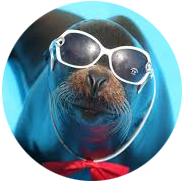 |
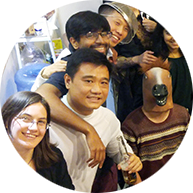 |
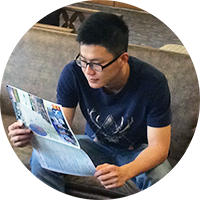 |
|
 Not a picture of you |
Showing other people |
Face not clearly shown |
Wearing sunglasses |
The good profile pictures are:
Friendly and professional-looking
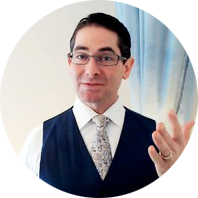 |
 |
|
 Professional |
Selfie |
Too casual |
Clear with good lighting
Do not take your photo at night and use a dark or blurry picture.
 |
|
|
|
Good lighting |
Bad lighting |
Bad lighting |
Close-up and recognizable
|
|
 |
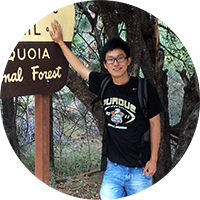 |
|
Recognizable |
Too close |
Too far away |
Detailed guidelines and requirements
Once uploaded, your profile picture will be circular.

- Format: JPG, GIF, or PNG
- Maximum size: 2MB; Ideal size: at least 400 x 400 pixels
- Do not use blurry or unclear pictures
- Do not use pictures with a busy background that detracts from you
- Do not use pictures that contain other people
- Do not wear sunglasses
- Do not use pictures where you are too close to or far away from the camera
- Do not use pictures that are too bright or too dark
- Do not use pictures that have commercial logos or personal contact information
- Do not edit pictures in a way that is misleading or obstructs your face
- Do not use pictures that were AI-generated or your virtual image
It will take up to 5 business days to review if you update the photo.
If you need to take some time off or are unavailable for teaching, do not demonstrate this by removing or changing your profile picture to something that does not meet profile requirements. Please manage this in your availability settings.
Comments
0 comments
Article is closed for comments.